Simultaneous Voice Translator: App, Device, or Desktop Software?
Phone apps, translator earbuds, and desktop software promise simultaneous voice translation. See which one fits travel, calls, video meetings, and streaming.
Quick answer
It depends on where the conversation happens. Face to face, a phone app is enough. On trips with poor signal, a dedicated device earns its price. But for phone calls, video meetings, streams, and voice chat on a computer, neither of those can get the translation into the call. There you need desktop software such as HaloVoice, which translates your voice as you speak and sends it into Zoom, Google Meet, Teams, Discord, or OBS through a virtual microphone.
The basics
What is a simultaneous voice translator?
A simultaneous voice translator listens while you speak and produces the translation as you go, instead of waiting for you to finish, press a button, and hand the phone over. The model is the conference interpreter in the booth, who is always a sentence behind the speaker but never stops the speech.
The alternative is consecutive translation: you talk, you pause, the translation plays, the other person answers, and the cycle repeats. It works, but it doubles the length of every conversation and makes interruptions and small talk nearly impossible.
No tool is truly instant. Speech has to be recognized, translated, and spoken again, so expect a short delay. What "simultaneous" really promises is that nobody has to stop and wait for the machine.
The three types of voice translator, compared
Search for a voice translator and you will find phone apps, gadgets on electronics sites, and software for teams, all under the same name. They are built for different conversations.
| Type | How it works | Best for | Weak spot |
|---|---|---|---|
| Phone app | Both people talk into one phone, which plays each translation aloud | Travel, shops, taxis, short face-to-face chats | Cannot get the translation into a call or meeting |
| Dedicated device or earbuds | A handheld translator or a pair of earbuds shared between two people | Frequent travelers, places with poor signal | Extra hardware to buy and charge, still in-person only |
| Desktop software with a virtual microphone (HaloVoice) | Translates your voice on the computer and feeds it into any app as your microphone | Calls, video meetings, streaming, gaming voice chat | Needs a Windows or macOS computer |
| Human interpreter | A professional translates live | Legal, medical, and high-stakes negotiations | Cost and scheduling |
Face to face: a phone app is enough
If the person is standing in front of you, do not overthink it. A free phone app with a conversation mode handles ordering food, asking for directions, and checking into a hotel. Google Translate is the obvious starting point, and most alternatives work the same way.
Dedicated devices and translator earbuds make sense when you travel often, want something you can hand to a stranger without giving them your phone, or need offline language packs where there is no signal.
This is not the situation HaloVoice is built for, and it would be the wrong tool for it.
Calls and video meetings: where phone apps stop working
Now put the other person on the far end of a video call. The phone app has a problem: it can hear you, but it has no way to get the translation into the meeting. People end up holding a phone next to the laptop speaker, which is slow, echoes, and looks exactly as awkward as it sounds.
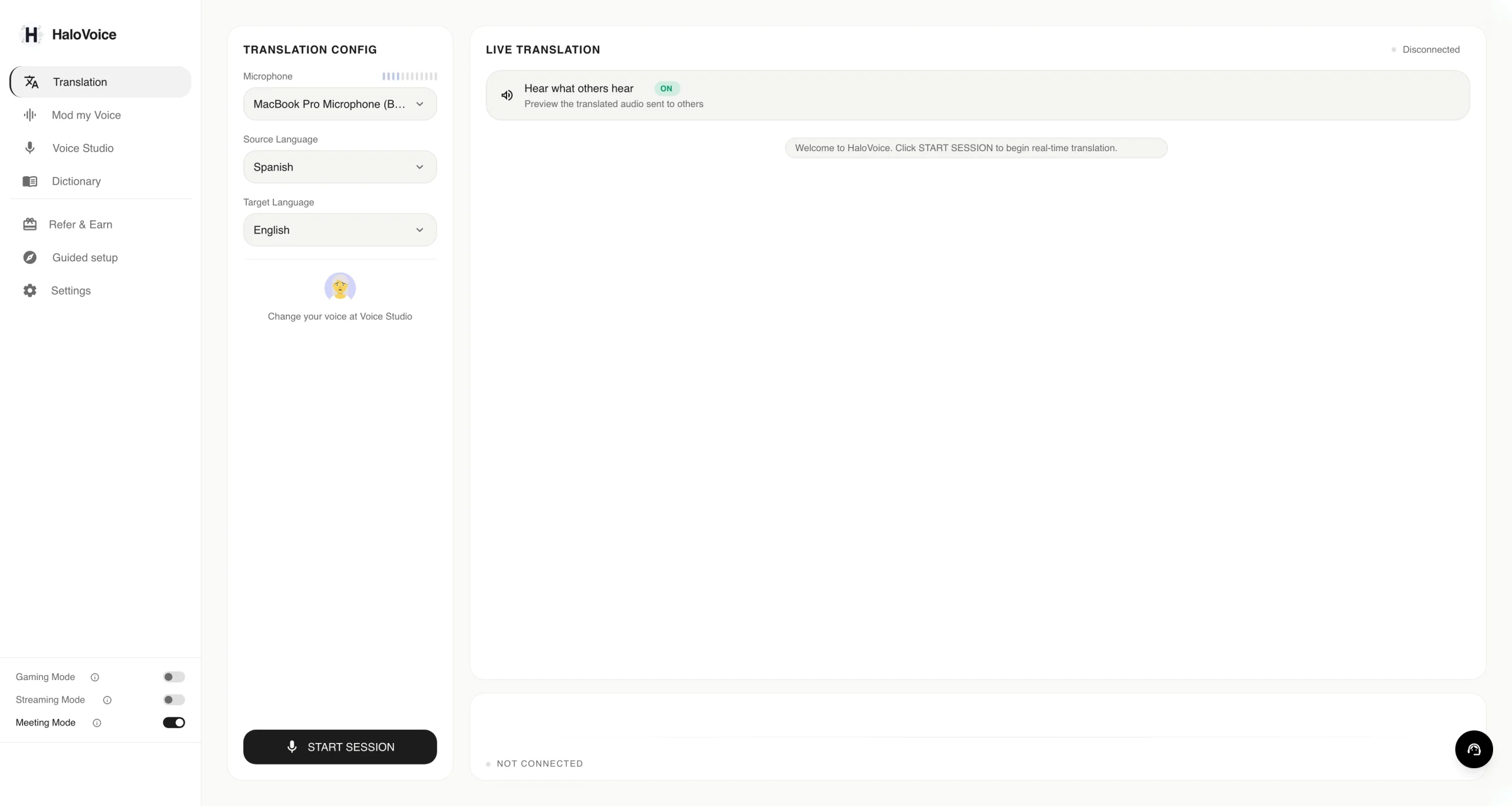
Desktop software solves this by changing where the translation happens. HaloVoice listens to your real microphone, translates your speech as you talk, and plays the translated voice into a virtual microphone. In Zoom, Google Meet, or Teams you select that virtual microphone as your input, and the other side simply hears you in their language. It also shows live captions, so you can check what was said.
Nobody else installs anything, there is no special meeting link, and it works in any desktop app that lets you choose a microphone.
- Client calls and sales demos with someone who does not share your language.
- Job interviews and remote work with international teams.
- Classes, tutoring, and support calls.
Streaming and gaming voice chat
The same virtual microphone works outside of meetings. Streamers add it as an audio source in OBS to reach viewers in another language. Players pick it as their input device in Discord so teammates abroad understand their callouts.
These are live, fast conversations where a consecutive, pass-the-phone translator is not an option at all.
What to check before you choose
Whichever type you need, the same handful of questions separates a tool you will keep from one you will uninstall after a day.
- Delay: try it in a real conversation, not a demo video. A short lag is normal. Waiting for every full sentence is not simultaneous.
- Where the translation goes: out loud from a speaker, or into the call itself. This is the question most people forget to ask.
- Voice: a flat generic voice is tiring over a long call. Some tools offer more natural voices and voice cloning so the translation still sounds like you. In HaloVoice, that lives in Voice Studio.
- Captions: seeing the text next to the audio lets you catch mistakes before they cause confusion.
- Languages: check your exact pair, not just the total count.
- Price: look for a free tier you can test without a credit card. HaloVoice is free for up to one hour a day, and Pro removes the limit.
Setup
How to set up a simultaneous voice translator for calls
The setup takes a couple of minutes and you only do it once per app.
- Step 1: Install HaloVoice for Windows or macOS and choose the language you speak and the language the other person should hear.
- Step 2: Click Start Session so the virtual microphone starts carrying your translated voice.
- Step 3: In your call app, open the audio settings and select HaloVoiceVirtual 2ch, the HaloVoice virtual microphone, as the microphone.
- Step 4: Join the call and speak normally, in complete sentences. Turn on Hear what others hear to preview the translated audio the other side receives, and use a headset so other voices stay out of your microphone.
What it does not do
HaloVoice translates your own voice on the way out. Each person who wants to be understood runs it on their own computer, and chooses their own target language.
It is a desktop app for Windows and macOS, so it is not the tool for a conversation at a market stall. There is a short delay while speech is recognized and translated, and slang can come out more literal than you intended. For client names, product terms, and project code names, add them to the HaloVoice Dictionary once so they are recognized correctly from the next session on.
For contracts, medical appointments, and anything where a mistranslation has real consequences, hire a human interpreter.
Which simultaneous voice translator should you use?
Match the tool to the place where the conversation happens. Most disappointment with voice translators comes from using an in-person tool for a call, or the other way around.
- In person and occasional: a phone app.
- Frequent travel or no signal: a dedicated device or translator earbuds.
- Calls, video meetings, streaming, and voice chat on a computer: desktop software with a virtual microphone.
- High-stakes conversations: a human interpreter.
HaloVoice FAQ
What is the best simultaneous voice translator?
It depends on the situation. For face-to-face conversations a phone app is enough. For calls, video meetings, streaming, and voice chat on a computer, desktop software such as HaloVoice is a better fit because it sends the translated voice into the call through a virtual microphone.
Which translator listens and translates in real time?
Phone apps with a conversation mode do it for in-person chats. HaloVoice does it on Windows and macOS for calls and meetings: it listens to your microphone, translates as you speak, and outputs translated voice and live captions.
Can I use a simultaneous voice translator in Zoom, Google Meet, or Teams?
Yes. With HaloVoice you select HaloVoiceVirtual 2ch as the microphone in the meeting app. The other participants hear the translation through the normal meeting audio and do not need to install anything.
Is there a free simultaneous voice translator?
Yes. Phone apps such as Google Translate are free for in-person use. HaloVoice has a free plan with up to one hour of translation per day and no credit card required.
How much delay does simultaneous translation add?
A short one. HaloVoice is designed for low-latency conversation, and the actual delay depends on your device, network, and language pair.
Which languages are supported?
HaloVoice supports 30+ languages, including English, Spanish, Portuguese, French, German, Japanese, Korean, Mandarin, and Arabic.
Keep reading
Related HaloVoice guides
Guide · 9 min read
Discord Translator Guide: Bots for Text, Live Translation for Voice Chat
Translator bots cover Discord text channels, but nothing on the server side can translate a voice channel. Here is what works for each, and how to set up live voice translation.
Guide · 10 min read
Live Meeting Translator: 7 Smart Ways to Use AI Translation in Zoom and Teams
A practical guide to using AI live meeting translation for Zoom, Microsoft Teams, sales calls, onboarding, support, and global collaboration.