
Arabic to English Voice Translator

Speak Arabic. Let others hear English in Zoom, Discord, Teams or OBS through the HaloVoice virtual microphone.

HaloVoice · Translation setup

ArabicEnglish

أريد حجز موعد غداً.

I would like to book an appointment tomorrow.

Illustrative translations; wording may vary in a live conversation.

HaloVoice Virtual Microphone → Zoom · Discord · Teams · OBS

Translation setup illustration
  • Arabic speech → English audio
  • Works with apps that let you select a microphone
  • Live captions in HaloVoice

Arabic to English in 4 steps

Set your languages in HaloVoice, then select its virtual microphone in your calling app.

1

Install HaloVoice

Install HaloVoice for Windows or macOS. Select Arabic as the source language and English as the target.

2

Start a session

Click “Start Session” in HaloVoice so the virtual microphone starts carrying your translated voice.

3

Select the virtual microphone

In your calling or streaming app’s audio settings, choose the Halo virtual microphone as the input. Try this language pair in your browser first.

4

Check your audio and join

Speak and check the microphone input meter in your calling app’s audio settings. Use an audio test or test call to confirm the English audio, then join your call or stream.

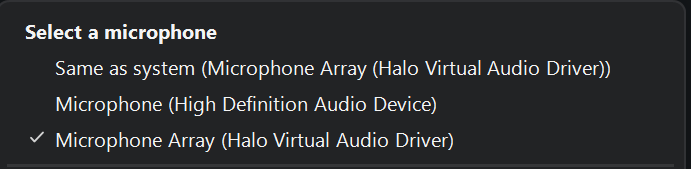
Selecting the Halo virtual audio driver in a microphone input menuView full-size microphone menu ↗

Device shown: Microphone Array (Halo Virtual Audio Driver)

Choose the Halo virtual microphone as the input device in your calling app.

Why use HaloVoice for Arabic?

Use one microphone setup for Arabic-speaking calls, streams and voice chat.

Spoken meaning, natural English order

Arabic and English structure sentences differently. Listen to the English preview to check that it conveys your intended meaning.

Test the Arabic you speak

Select Arabic in the app. Try everyday phrases in your own dialect, since pronunciation and vocabulary can affect the result. Test before an important call.

Check names and numbers

Listen to the English preview before an important call. Confirm names, prices and dates with the other person; spell out or repeat details when needed.

Start free

Try the language pair on the free plan before choosing a paid plan for regular use.

Example phrases

Arabic · Sentence meaning

أريد حجز موعد غداً.

English

I would like to book an appointment tomorrow.

Arabic · Egyptian Arabic

إزيك؟

English

How are you?

Arabic · Numbers

السعر ١٢٣ دولاراً.

English

The price is 123 dollars.

Illustrative translations; wording may vary in a live conversation.

Where Arabic to English voice translation fits

Use the same setup in calling, streaming and gaming apps that accept a virtual microphone.

Customer and client calls

Customer and client calls

Arabic-speaking support staff, clinicians, agency teams, and salespeople can speak Arabic while English-speaking customers hear English — or switch the language direction for the reverse conversation. See the Zoom translator setup.


Streaming and content

Streaming and content

Arabic-speaking creators can reach English-speaking viewers with translated audio. See the OBS voice translator setup. Live captions appear in HaloVoice; showing them on stream requires a separate caption setup.

HaloVoice translates more than Arabic. See how the real-time voice translator handles other languages, calls, and streams — the same virtual microphone, whichever pair you need.

Trying Spanish instead? Read the Spanish to English voice translator setup.

Arabic to English translation FAQ

Setup details for Arabic speakers being heard in English.

How do I translate Arabic to English in real time?

Install HaloVoice, choose Arabic as your spoken language and English as the target, click “Start Session”, then set HaloVoice Virtual Microphone as the microphone in the app you are talking in.

Does it work with Arabic dialects like Egyptian or Gulf Arabic?

Select Arabic and test a few sentences in your own dialect. Recognition and translation quality can vary by dialect, vocabulary and audio conditions; confirm the result before a live call.

Can the other side hear English while I keep speaking Arabic?

Yes, and they install nothing. They hear the English audio through the normal call, stream, or game audio, while you keep speaking Arabic on your side.

Can it translate English to Arabic as well?

Yes — switch the source and target languages in the app. The English-to-Arabic direction runs on the same session and the same virtual microphone.

Is Arabic to English included in the free plan?

You can try this language pair on the free plan. Check the current plan limits before relying on it for longer conversations.

How much delay does Arabic to English add?

HaloVoice is designed for low-latency conversation. Actual delay depends on your device, network, and the language pair, and sits alongside your normal call or stream delay.

Ready to speak Arabic and be heard in English?

Download HaloVoice, select Arabic → English, and test the virtual microphone before your next call.